Try our official app! Developed by Calculatoric Team:

The Gas Mileage Calculator code provided is a high-utility tool designed to bridge the gap between simple math and smarter driving habits. Whether you think in Miles per Gallon (MPG) or Liters per 100 Kilometers (L/100km), this tool provides a dual-system analysis of how your vehicle consumes fuel.
Core Functions & Analytical Logic
This calculator goes beyond basic division, offering a comprehensive look at the financial and mechanical health of your trip:
-
Bilingual Unit System: The tool features a seamless toggle between Imperial and Metric systems. It uses the standard conversion factor ($235.215$) to ensure that even if you switch units mid-calculation, the data remains consistent and accurate.
-
Cost-Benefit Analysis: By including an optional fuel price input, the code calculates the Cost Per Mile (or Kilometer). This helps drivers understand the micro-costs of their commute, making it easier to budget for long-distance travel.
-
Dynamic Performance Rating: The script features a visual "Efficiency Rating Bar." This uses conditional logic to benchmark your results against industry averages. It shifts color (Green for efficient, Red for high consumption) to give you immediate visual feedback on your vehicle’s performance.
-
AI-Driven Maintenance Tips: Based on the calculated efficiency, the script dynamically generates a list of actionable advice. If your efficiency is low, it suggests checking tire pressure or spark plugs; if it’s average, it focuses on driving behavior like highway speeds and idling.
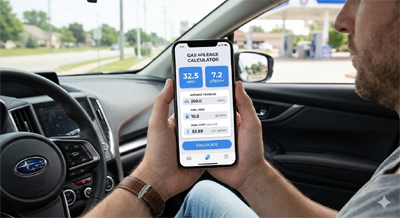
How to Use the Calculator
The interface is built for speed and clarity:
-
Select Your System: Choose between Imperial (US) or Metric (International) units.
-
Input Distance & Fuel: Enter how far you traveled and exactly how much fuel was required to refill the tank.
-
Add Optional Data: Input the fuel price and your current odometer reading for a more detailed cost report.
-
Review the Report: Click "Calculate" to see your efficiency score, your rating on the progress bar, and a customized list of tips to save money on your next trip.
Technical Breakdown for Developers
-
Responsive UI: Built using Bootstrap 5, the layout uses a
btn-groupfor unit toggling andinput-groupcomponents for a professional, app-like feel. -
Validation Layer: The JavaScript includes a robust validation check to prevent
division by zeroerrors or empty inputs, ensuring the app doesn't crash if a user enters a "0" distance. -
Real-Time Cleanup: The
oninput="clearResults()"function ensures that if a user changes their data, the previous (now incorrect) results disappear instantly, maintaining data integrity.